
How to Choose an Ergonomic Office Chair for Home Working


If you're working from home for more than a couple of hours a day, your chair matters more than almost anything else in your setup. The wrong chair doesn't just cause discomfort — it causes back pain, poor posture, reduced concentration and long-term musculoskeletal problems that compound over time. The right one makes a measurable difference to how you feel at the end of a working day.
The problem is that 'ergonomic' has become one of the most overused words in office furniture marketing. Almost every chair claims to be ergonomic — but genuine ergonomic design is about specific, adjustable features that allow the chair to support your body rather than forcing your body to adapt to the chair. Knowing what to actually look for cuts through the marketing noise.
This guide covers everything you need to make a well-informed decision: the features that genuinely matter, the ones that are nice-to-have, what to avoid, and how to match a chair to the way you actually work.
What Does 'Ergonomic' Actually Mean?
Ergonomics is the science of designing equipment and environments to fit the people using them. Applied to office seating, it means a chair that can be adjusted to support your specific body — your height, weight, sitting posture, and working habits — rather than a one-size-fits-all design that works adequately for nobody in particular.
A genuinely ergonomic office chair allows you to sit with your feet flat on the floor, your knees at roughly a 90-degree angle, your lower back supported, your shoulders relaxed, and your screen at eye level. Achieving all of that simultaneously requires multiple independent adjustment points — not just seat height, but seat depth, lumbar position, armrest height, and backrest angle.
The distinction matters because a chair with only basic height adjustment is not ergonomic in any meaningful sense, regardless of what the product listing says. When you're evaluating chairs, count the adjustment points.
The test: if you can adjust the chair to fit you — rather than adjusting how you sit to fit the chair — it's genuinely ergonomic. If you find yourself perching, slouching, or compensating with cushions after five minutes, it isn't.
The Features That Genuinely Matter
1. Lumbar Support
Lumbar support is non-negotiable for anyone spending more than an hour at a desk. The lumbar region is the inward curve of your lower spine, and it's the area most at risk from prolonged sitting. Without support, the lower back rounds outward, placing sustained pressure on the lumbar discs and the surrounding musculature.
Good lumbar support should be adjustable in height and, ideally, in depth — allowing you to position it precisely where your lower back curves. Fixed lumbar support can work if it happens to sit at the right position for your body, but adjustable support is significantly more reliable across different body types.
When evaluating a chair, press your lower back firmly into the backrest. You should feel the lumbar support meeting your back, not a flat panel. If there's a gap, or if the support sits too high or too low, the chair is unlikely to suit you for extended use.
2. Seat Height Adjustment
Seat height is the most basic adjustment, but it's worth doing properly. Your feet should rest flat on the floor with your knees at approximately 90 degrees. If your feet dangle, blood flow to the lower legs is restricted. If your knees are higher than your hips, lower back strain increases.
Most quality office chairs offer a pneumatic height adjustment range of around 40–52cm from the floor — sufficient for most adults. If you're particularly tall or short, check the specific range before buying rather than assuming it will accommodate you.
3. Seat Depth Adjustment
Seat depth is one of the most overlooked features in office chair buying, and one of the most important. If the seat is too deep, it cuts into the back of your knees and forces you to perch forward, losing lumbar contact. If it's too shallow, you lose thigh support.
The correct seat depth leaves approximately two to three finger-widths between the front edge of the seat and the back of your knees. A seat depth slider allows you to dial this in precisely. Chairs without seat depth adjustment require you to be approximately the right size for the fixed depth — which is a significant gamble when buying online.
4. Backrest Angle and Tilt Tension
Being able to recline slightly — typically 100 to 120 degrees from vertical — reduces the compressive load on your lumbar spine. A fully upright sitting position is not necessarily the healthiest; a slight recline with lumbar support maintained distributes weight more evenly.
Tilt tension control allows you to adjust how much resistance the chair provides as you recline — important because a 60kg person and a 100kg person need very different spring tensions to recline comfortably. Without tilt tension adjustment, either the chair won't move at all or it'll tip back immediately, depending on your weight relative to the factory setting.
Synchronised tilt mechanisms — where the seat and backrest move in coordinated proportion as you recline — are a step up from basic tilt and worth looking for on mid-range and premium chairs.
5. Armrest Adjustability
Armrests reduce the load on your shoulders and neck by supporting the weight of your arms. But fixed armrests are often worse than no armrests, because they can force your shoulders into an unnatural position if they sit at the wrong height.
Height-adjustable armrests are the minimum standard worth accepting. 3D or 4D armrests — which adjust in height, width, depth and angle — offer the most flexibility and are particularly valuable for people who alternate between typing and writing, or who use a mouse extensively.
The correct armrest position allows your elbows to rest lightly with your shoulders relaxed and your forearms roughly parallel to the floor.
6. Headrest
A headrest supports the neck and upper spine during periods of recline and is particularly valuable for people who take calls, think, or read without actively typing. It's less critical if you work predominantly upright and actively.
If you choose a chair with a headrest, ensure it's height-adjustable. A fixed headrest at the wrong height pushes your head forward into a chin-down position, which is worse than no headrest at all.
Mesh vs Fabric vs Leather: Which Material Is Right for Home Working?
Mesh
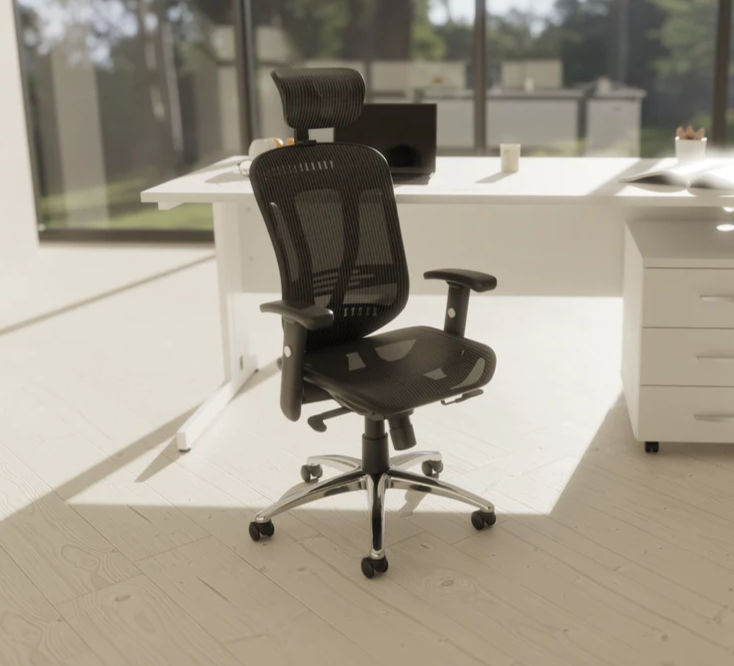
Mesh backrests have become the dominant choice for serious home workers, and for good reason. Breathability is the primary advantage — mesh allows air to circulate behind your back, preventing the heat buildup that makes extended sitting uncomfortable, particularly in warmer months or in rooms without air conditioning.
A quality mesh also provides passive lumbar support through its tension and contour — the mesh conforms somewhat to the shape of your back rather than presenting a rigid flat surface. Our mesh office chairs range includes options from entry-level to premium, all with the breathable backrest that makes long working days significantly more comfortable.
The consideration: mesh quality varies enormously. Cheap mesh sags over time, loses its tension, and provides progressively less support. A well-specified mesh chair from a quality manufacturer will maintain its properties for years; a budget mesh chair may deteriorate within twelve months of regular use.
Fabric
Fabric upholstery offers a softer feel than mesh and a wider range of colour options — useful if your home office is part of a living space and you want the chair to complement your interior. Fabric ergonomic chairs work well in cooler rooms or for people who find mesh uncomfortable.
The trade-off is breathability — fabric retains heat more than mesh and can feel warm during extended use. It also absorbs spills and requires more careful maintenance than mesh or hard-wearing leather alternatives.
Leather and Leather-Look
Genuine and bonded leather chairs project a professional, executive look and are easy to wipe clean — making them practical choices in households with children or pets. Our executive leather office chairs range covers both genuine and high-quality bonded leather options.
The consideration for home working specifically: leather is the least breathable of the three options. For long working days in warmer environments, this is worth factoring in. Leather chairs are also typically heavier, which matters if you move your chair frequently.
How Much Should You Spend on an Ergonomic Office Chair?
This is the question most people ask first, and the honest answer is: it depends on how many hours a day you sit in it.
Under £100 — Basic Comfort for Occasional Use
At this price point you're getting basic height adjustment, limited lumbar support, and entry-level build quality. Suitable for occasional or part-time use — a couple of hours a day — but not for full working days. Our budget chairs under £100 are honest about what they offer: good value for their purpose, not a substitute for a proper ergonomic chair if you're working eight hours a day.
£100–£250 — The Productive Middle Ground
This range is where proper ergonomic features begin to appear consistently: adjustable lumbar support, seat height and depth, height-adjustable armrests, and synchronised tilt. For most home workers doing four to six hours at a desk, this is the sweet spot of value and capability. Our ergonomic office chairs range has strong options throughout this bracket.
£250–£500 — Full Adjustability for Full Working Days
At this level you're getting comprehensive adjustment, higher-grade mesh or upholstery, stronger build quality, and — often — 24-hour usage ratings, meaning the chair is designed for sustained use without degradation. This is the appropriate investment for anyone working a full day, every day, from home.
£500+ — Premium Posture Chairs
Premium ergonomic chairs at this price point typically feature advanced mechanisms, higher-grade materials, and extensive warranties. They represent genuine long-term value for heavy users. Our 24-hour usage office chairs include options in this range — chairs specified for round-the-clock use in demanding environments, equally well-suited to intensive home working.
A useful way to think about it: divide the chair price by the number of working days per year. A £300 chair used five days a week costs around £1.15 per working day over five years. Back pain treatment costs considerably more.
Operator Chairs vs Ergonomic Chairs — What's the Difference?
You'll often see operator and task chairs listed separately from ergonomic chairs, and the distinction is worth understanding.
Operator chairs are designed for task-focused work — data entry, call handling, active keyboard work — where you sit relatively upright and move frequently. They tend to be lower in profile, lighter, and more manoeuvrable than high-back ergonomic chairs.
Ergonomic chairs, in the fuller sense, prioritise sustained postural support over agility — deeper lumbar support, higher backrests, more adjustment points, and better recline mechanisms. The right choice depends on the nature of your work: if you're predominantly at a keyboard or on calls and moving frequently, an operator chair may serve you better than a high-back ergonomic model.
What to Avoid When Buying an Ergonomic Chair Online
• Vague lumbar claims. 'Lumbar support' as a feature label means nothing without specifying whether it's fixed or adjustable. Look for 'adjustable lumbar support' and check whether it adjusts in height, depth, or both.
• No seat depth adjustment. If a chair in the £150+ range doesn't offer seat depth adjustment, it's a significant omission. Fixed seat depth is acceptable at budget price points; at mid-range it's a corner cut.
• Fixed or non-height-adjustable armrests. Fixed armrests at the wrong height cause shoulder tension and are often worse than no armrests. Height-adjustable arms are a minimum standard for regular use.
• No weight rating. Every chair should carry a stated weight capacity. If it isn't listed, ask. A chair used at or beyond its rated capacity degrades significantly faster and may not provide the support it was designed to offer.
• Gaming chair positioning. Gaming chairs are designed for gaming posture — reclined, relaxed — not for the upright, active posture of office work. Despite their visual presence and ergonomic-sounding marketing, most are not appropriate substitutes for a proper office chair for working hours.
Pairing Your Chair with the Right Desk

An ergonomic chair works best alongside a desk at the right height. If your desk is too high or too low relative to your chair, you'll compensate with your posture regardless of how well the chair is adjusted. Height-adjustable office desks allow you to dial in the desk height precisely — and the option to stand periodically throughout the day adds a meaningful wellness benefit on top of the ergonomic seating investment.
For fixed-height desks, the standard working height of 720–740mm suits most adults at a correctly adjusted chair height. If you're working on a surface that's significantly higher or lower than this, adjusting the chair alone won't fully resolve the posture problem. Browse our full range of home office desks if you're setting up a new workspace from scratch.
It's also worth considering a chair mat if your floor is carpeted or hard wood. Chair mats protect flooring, reduce the rolling resistance that causes you to grip the floor with your feet (which contributes to lower back tension), and make it easier to reposition throughout the day.
Summary: What to Look For
When evaluating any ergonomic office chair for home working, check these features in order of importance:
1. Adjustable lumbar support — height-adjustable as a minimum, depth-adjustable if budget allows
2. Seat depth adjustment — essential for correct knee clearance and lower back contact
3. Seat height adjustment — pneumatic, with a range that suits your height
4. Height-adjustable armrests — minimum standard; 3D or 4D preferred for intensive use
5. Tilt mechanism with tension control — synchronised tilt preferred for extended working days
6. Breathable backrest material — mesh for most home workers; fabric or leather for cooler environments or aesthetic preference
7. Weight rating — confirmed as appropriate for your weight
Browse the full range of ergonomic office chairs at Bob's Home Office Furniture — hand-picked for home workers, with free UK mainland delivery on every order and 14-day free returns.


Comments